Stats
The axes you’re growing on. Pick three to ten and name them whatever you want.
 LifeQuest
In development
LifeQuest: self-improvement app
Six weeks into the gym and the mirror looks the same. That’s the week most people quit. LifeQuest turns what you want into a tree of steps small enough to start on a Tuesday, and every one you finish moves a stat on a character sheet you named yourself. You can read the progress before you can see it.
Free. Coming to Android and iOS.
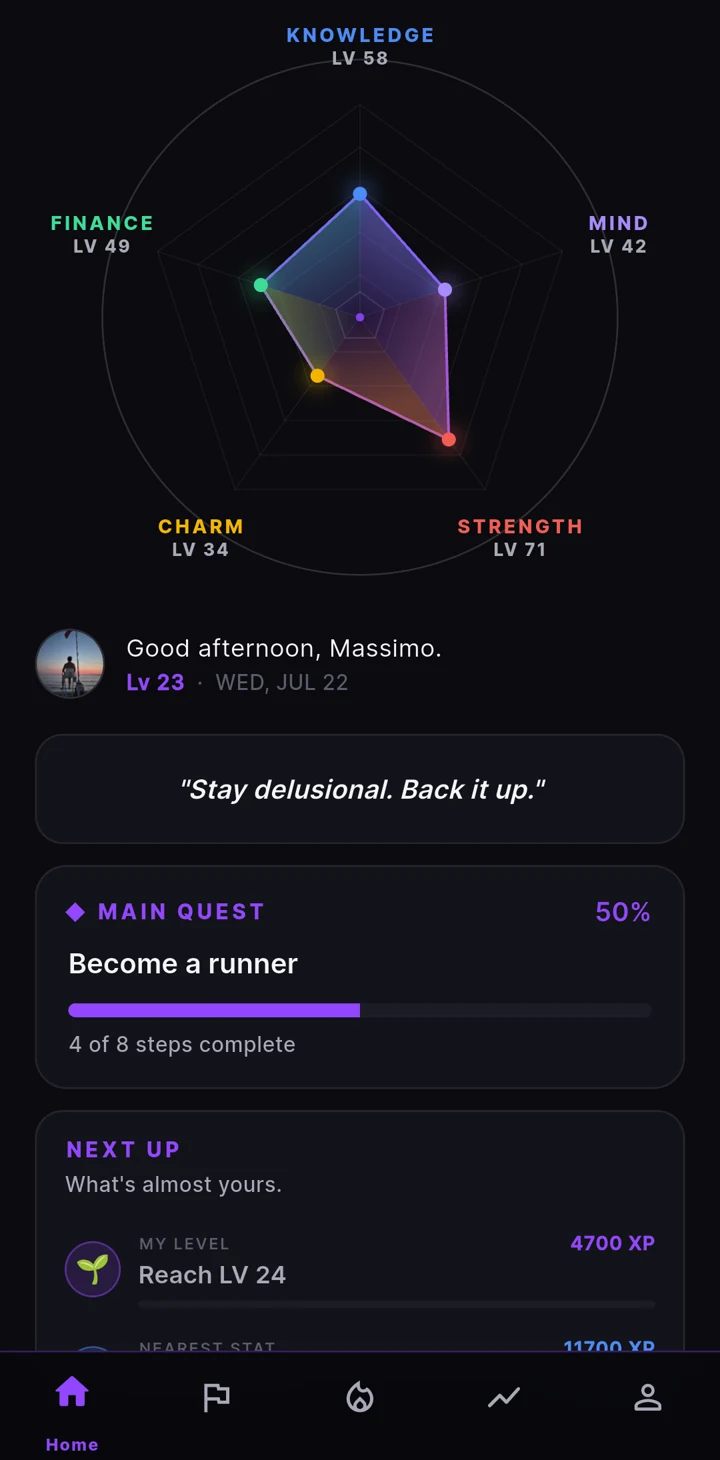
The StatWheel. Five axes to start, three to ten in total, all of them yours to rename.
The idea
Improving yourself stays vague until you have something concrete to work with. LifeQuest gives you five things: stats, skills, quests, habits and achievements. They turn what you want into work you can start on and progress you can read. LifeQuest ships no template for a good life, because it has no idea what you’re building. A character sheet is easier to read than a vague sense that you’ve been trying.
The axes you’re growing on. Pick three to ten and name them whatever you want.
Specific things you’re getting good at, ranked by letter. Cooking, Spanish, boxing, whatever you actually practise.
What you want, split into steps small enough to start. Main quests for the big ones, side quests for everything else.
The things you repeat, logged every time you do them.
Moments worth marking. Twenty-seven come with the app and the rest you write yourself.
Nothing here is tuned to keep you opening it. Reminders stay off until you switch them on, and you pick which ones fire and when. Your character doesn’t decay while you’re away, and no number moves because you launched the app. If you reach a point where you don’t need LifeQuest any more, it did its job.
How it works
Stats are the parts of your life you actually want to grow. Pick between three and ten, name them whatever fits. Five come ready to go, Knowledge, Mind, Strength, Charm and Finance, but nothing is fixed: rename them, reorder them, add your own, drop the ones that aren’t you.
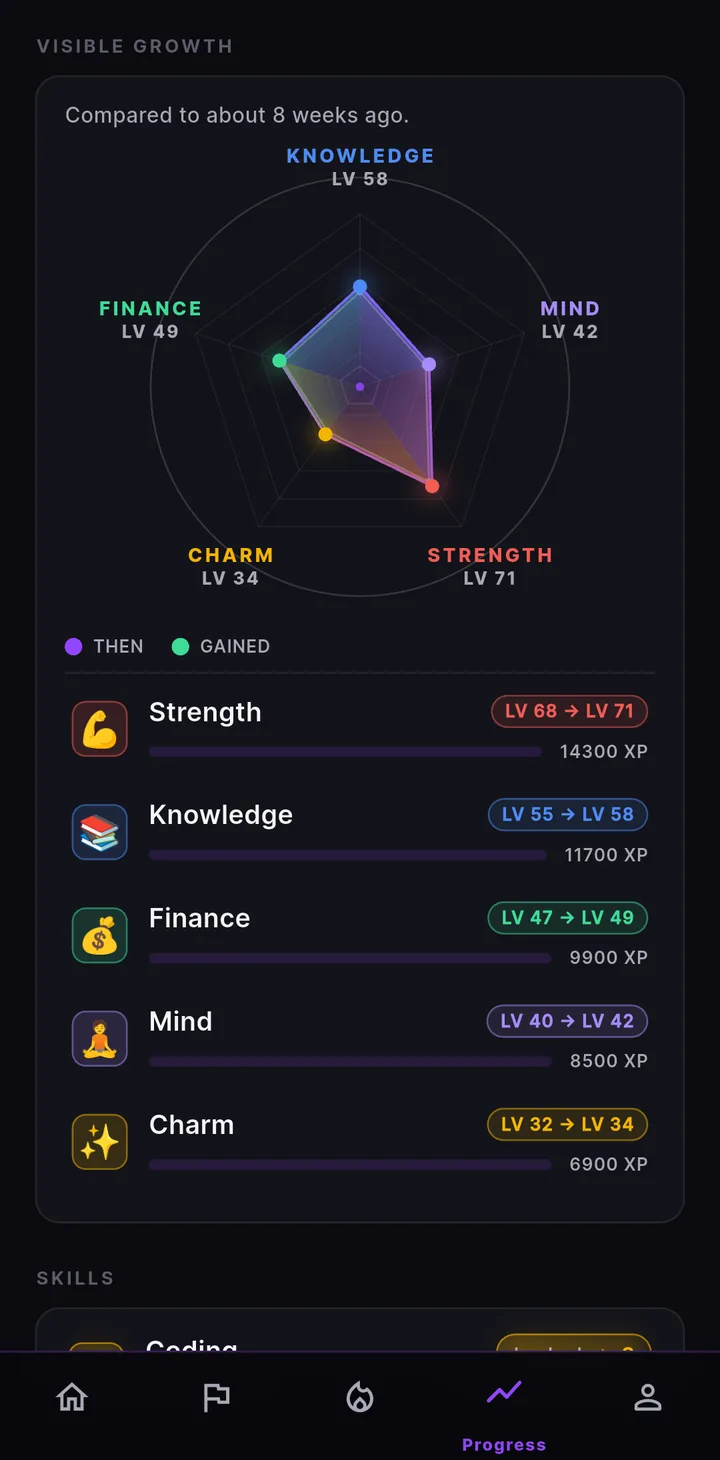
The wheel is a polygon with one corner per stat, so its shape is a picture of where you’re putting the work. Every quest and habit you finish feeds the stats you tied it to, and the shape fills out from the life you’re actually living.
Quests
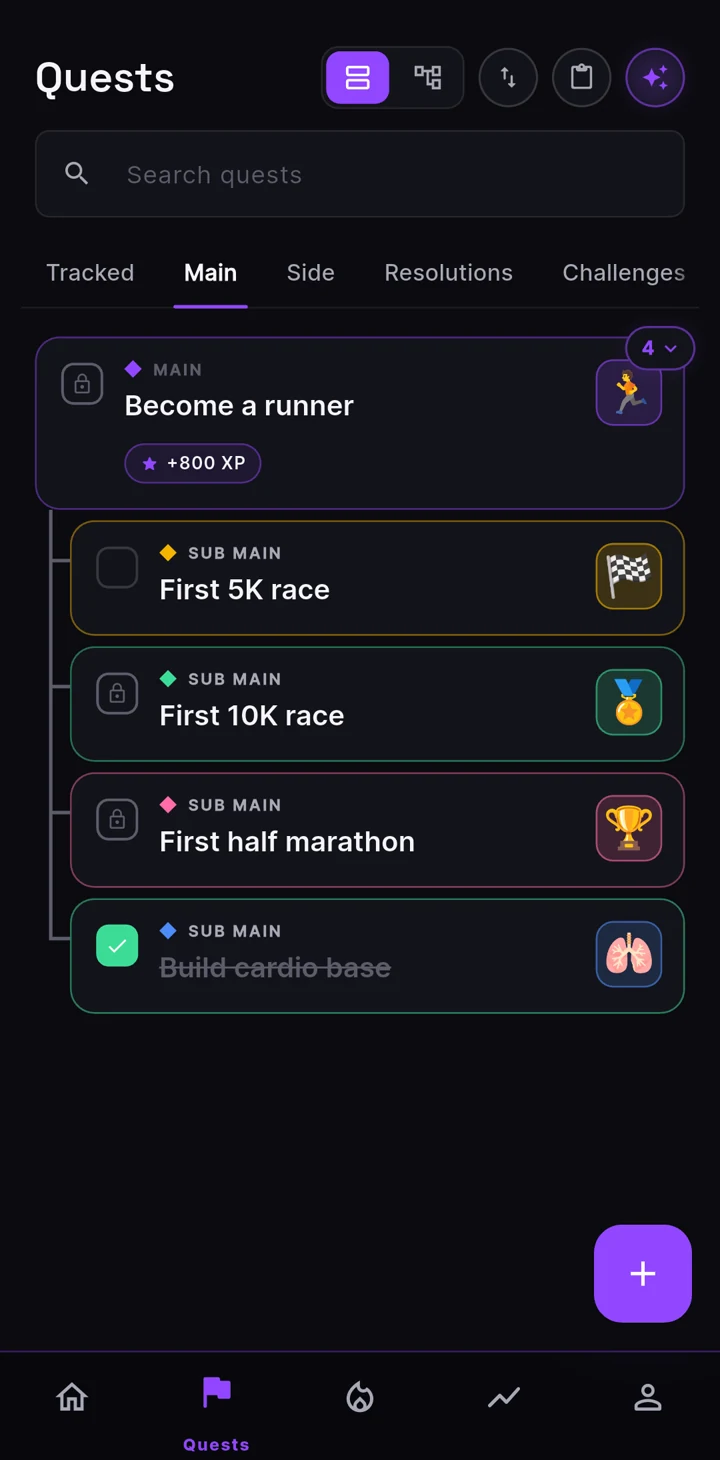
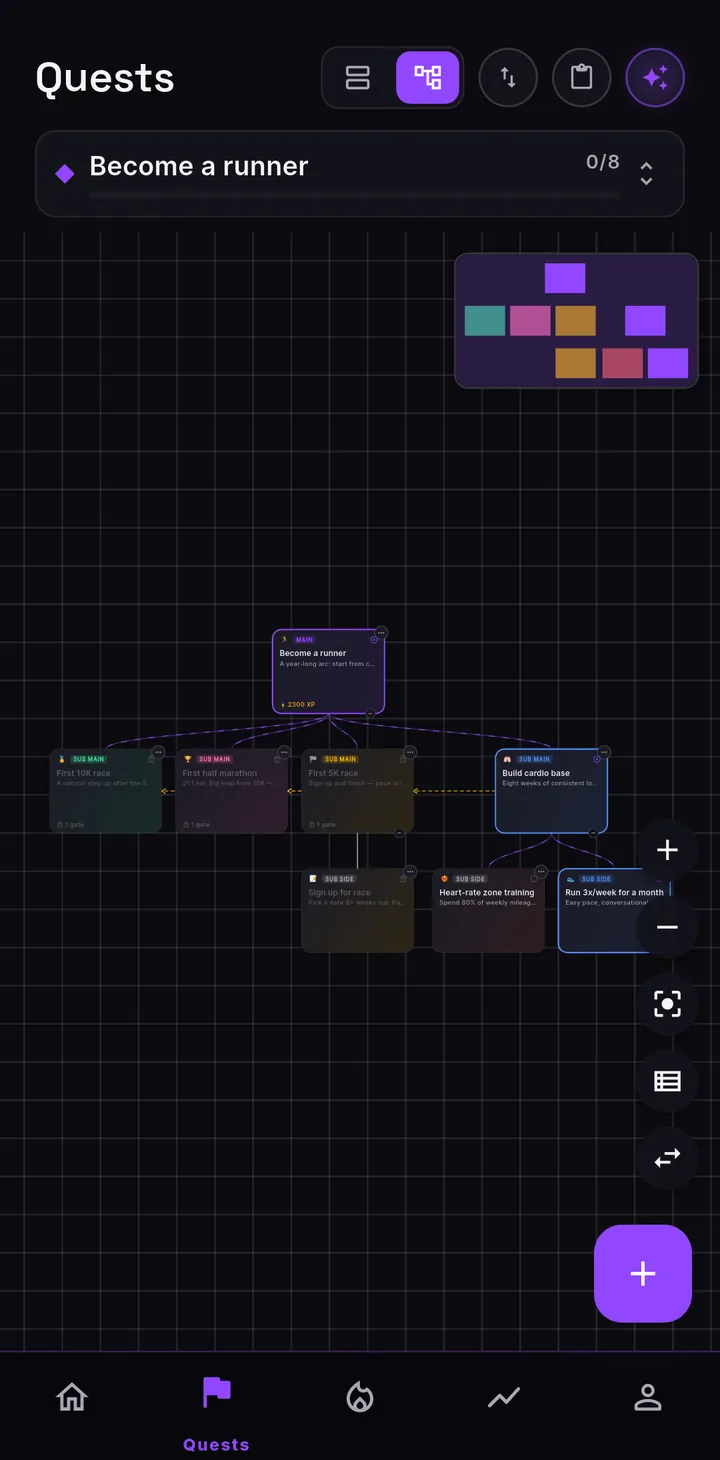
Become a runner is a wish. You can’t do it on a Tuesday. So a quest breaks down the way an OKR does: the thing you actually want sits on top, and the steps that would prove it hang underneath, splitting until what’s left is small enough to start today. Read it as a list or as a tree, whichever way you think.
One of the big ones. The thing you’d actually put on a wall. Everything else hangs off it.
The other things you want out of this life. Learn an instrument, see the world, get properly strong. Worth living for their own sake, all along the way.
Break a big quest down into smaller, more achievable ones. Nest them as deep as you like, so there’s always a step small enough to start today.
Tag a quest as this year’s resolution and it gets its own shelf, a review each December and a planning nudge each January.
Quests the AI hands you every so often to push you at something or out of your comfort zone. Opt in, then set how often they come and what they aim at.
The whole community gets the same quest every so often, with a window to finish it. Everyone chipping at the same thing, improving together.
A shared quest a group chips away at together, progress pooling as everyone logs theirs.
Habits
Things you want to do on a rhythm you set: daily, weekdays, certain days, every few days, or no schedule at all. Check in with a tap, a counter, or a checklist, and each one feeds your stats.
Streaks are optional, because a missed day is not a failure, sometimes you are just out living your life. Nothing here shames a lapse, so the persistence is yours, and you fall off far less for it.
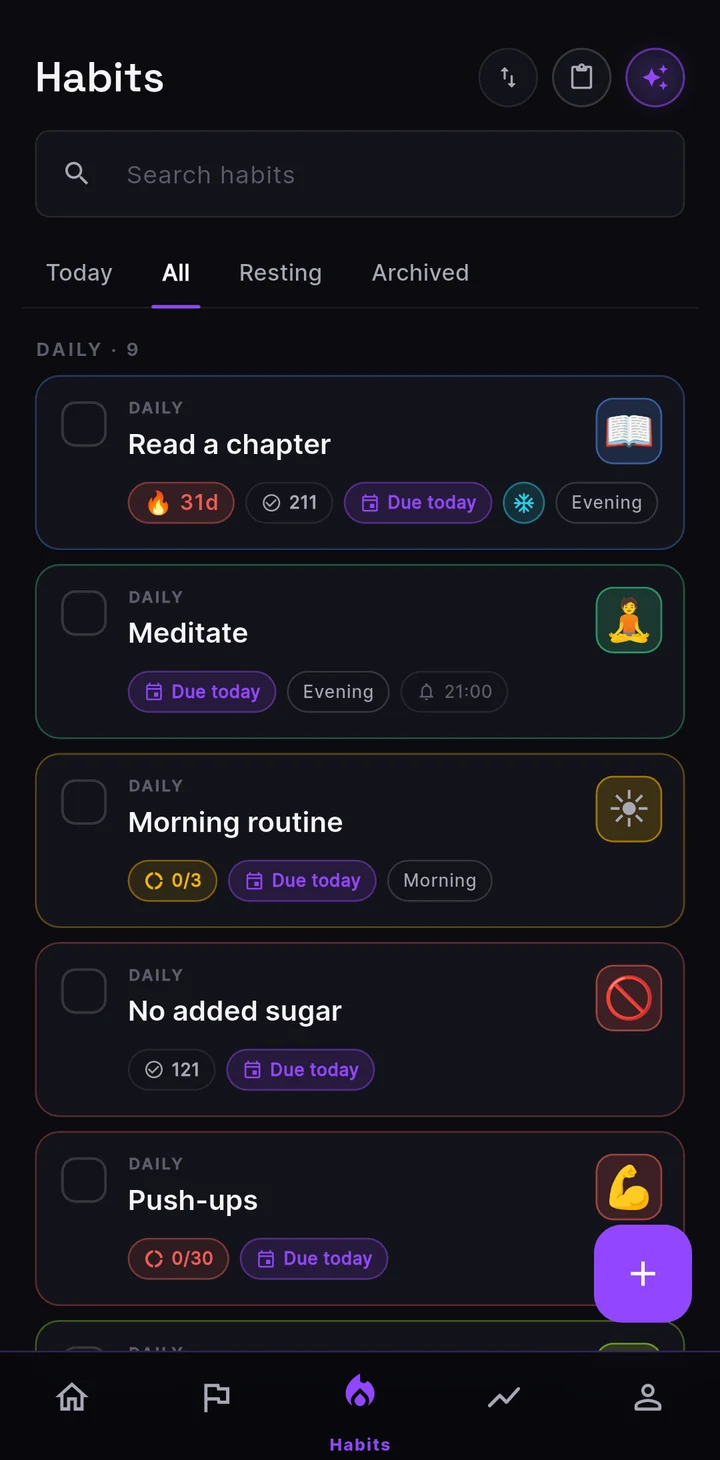
Pause the streak and it holds while you’re gone. It’s a switch, not a currency: nothing to spend, no limit, nothing to buy.
Point a habit at the stats it actually builds, and say how much each check-in is worth. A tick is never generic: it moves the parts of the wheel you meant it to.
Skills
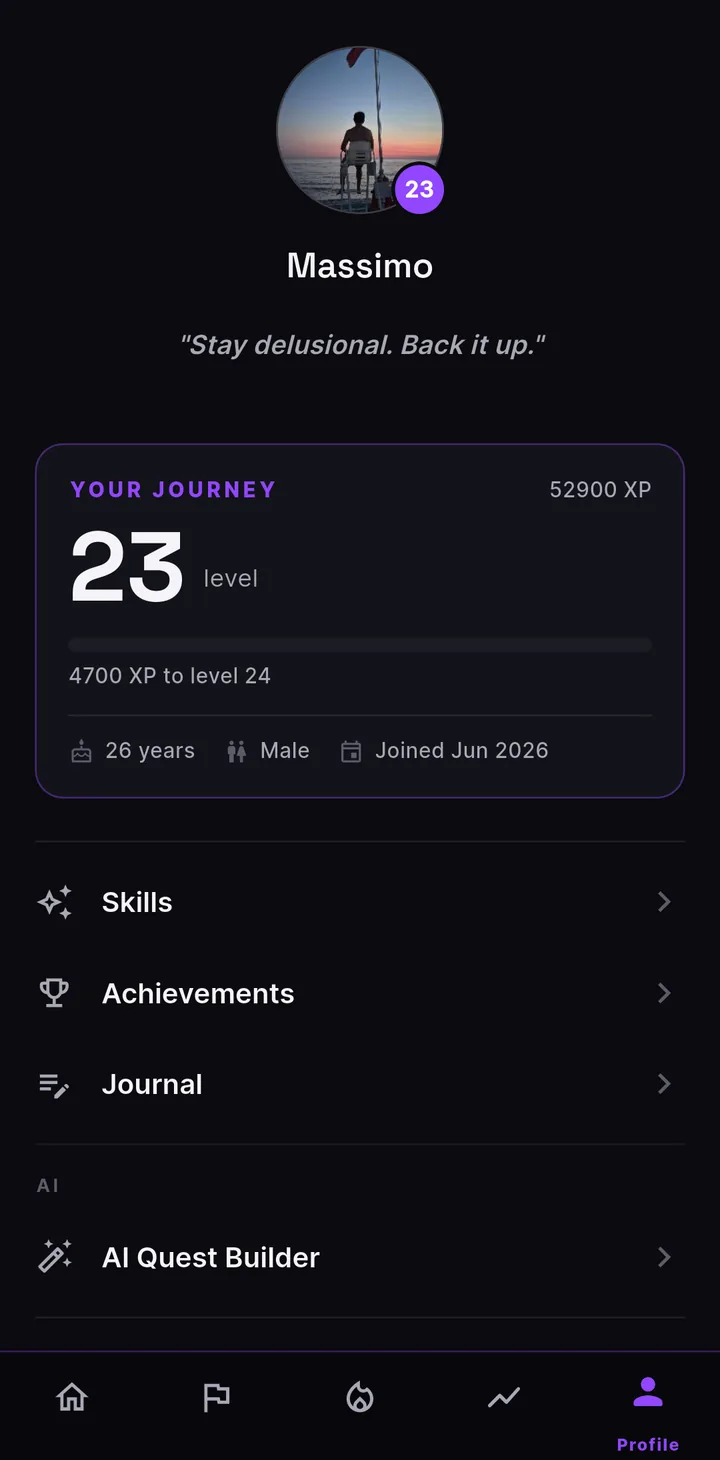
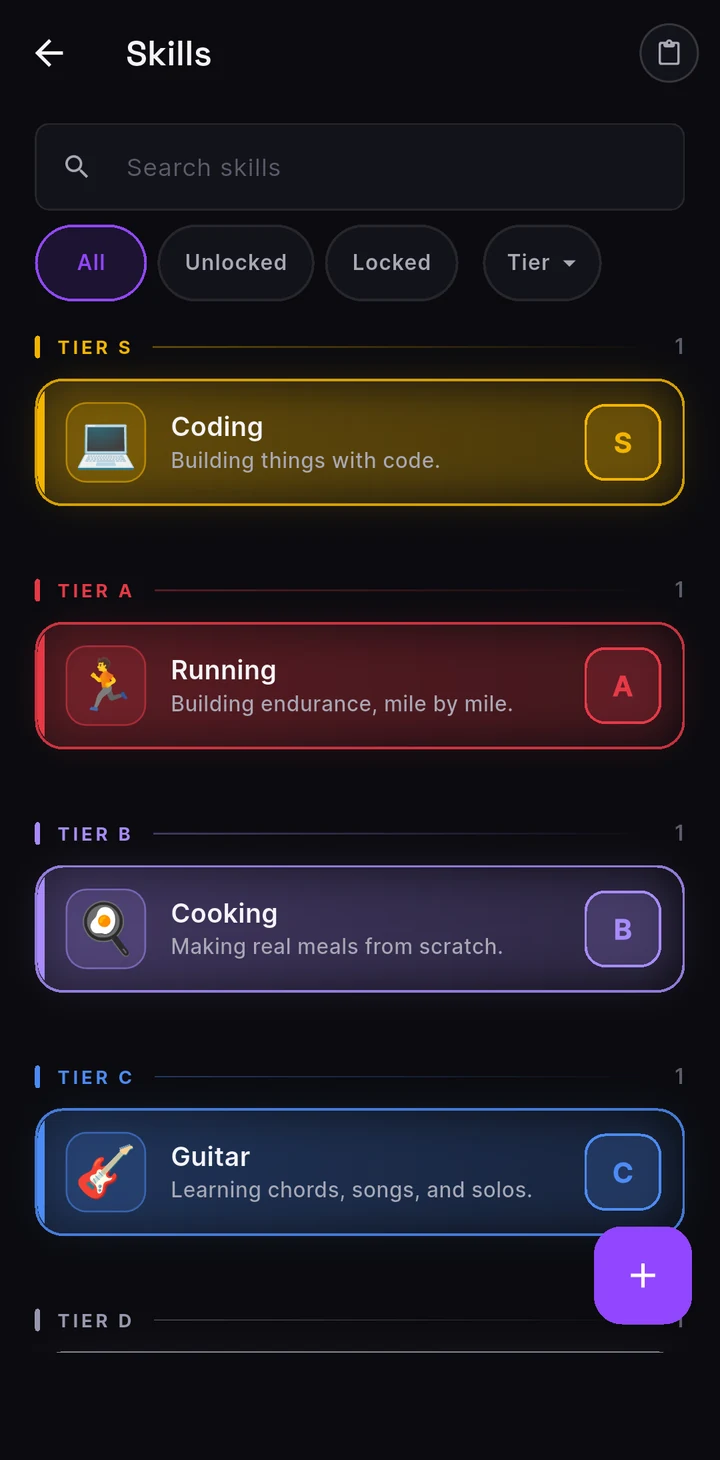
A skill is a real thing you are getting better at: cooking, Spanish, guitar, boxing. Stats are the broad shape of your life; skills are the concrete crafts underneath, the competence you build one rep at a time. Each sits on a ladder from F to S, so getting better stops being a vague feeling and turns into something you can point at.
They climb as you put in the work: the right quest can unlock a new skill or move one up a tier, and a demanding quest can wait on a skill until you are ready for it. You can even name a skill before you have it and let the work bring it in, which turns a far-off ambition into a rung you can reach for.
Achievements
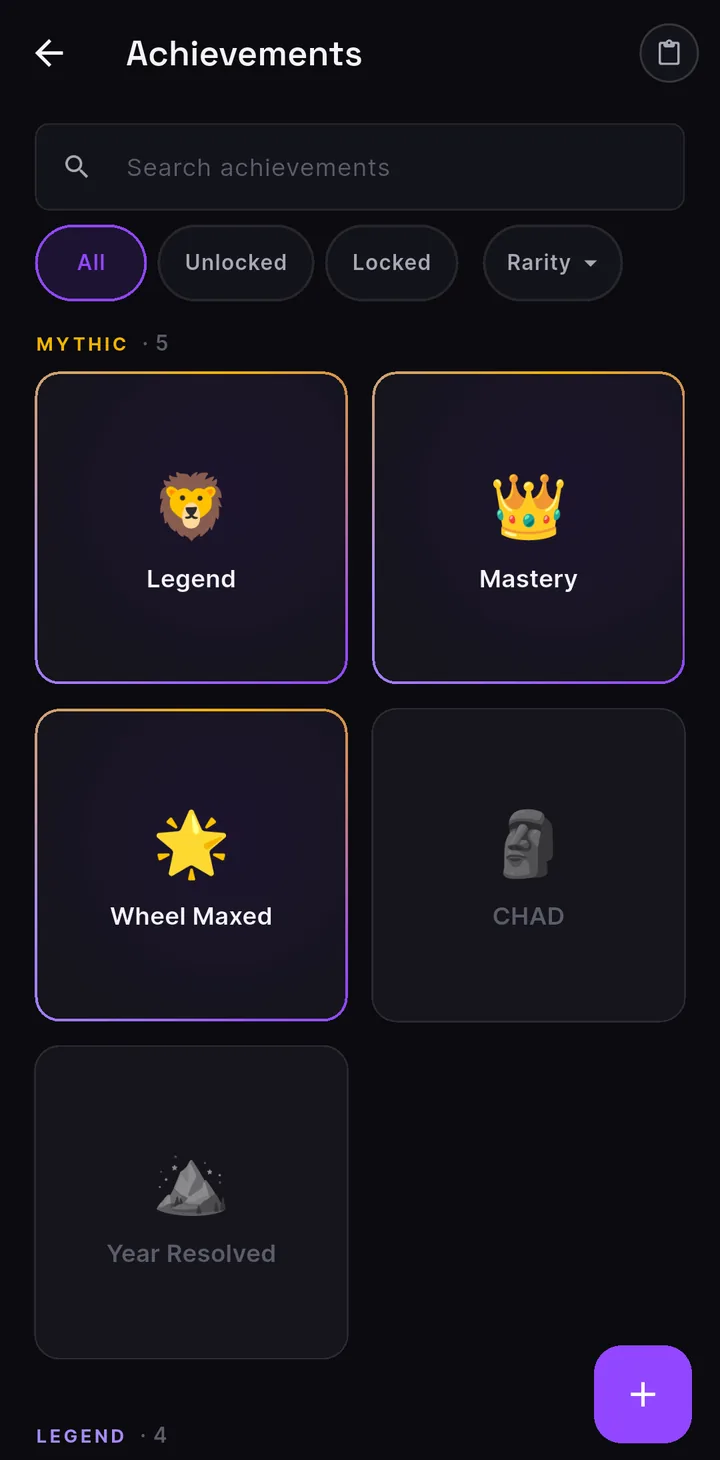
A few come with the app, but they are just records: rename them, re-icon them, or delete them and write your own. Deciding what is worth marking is the whole point.
Give one a title, a line for how it is earned, and an icon or a photo you took. Then let it unlock on its own when the conditions come true, tie it to a quest, or flip it by hand to log something you managed long before the app.
Every badge lands on the wall at a rarity tier, and you decide what a thing deserves.
Progress
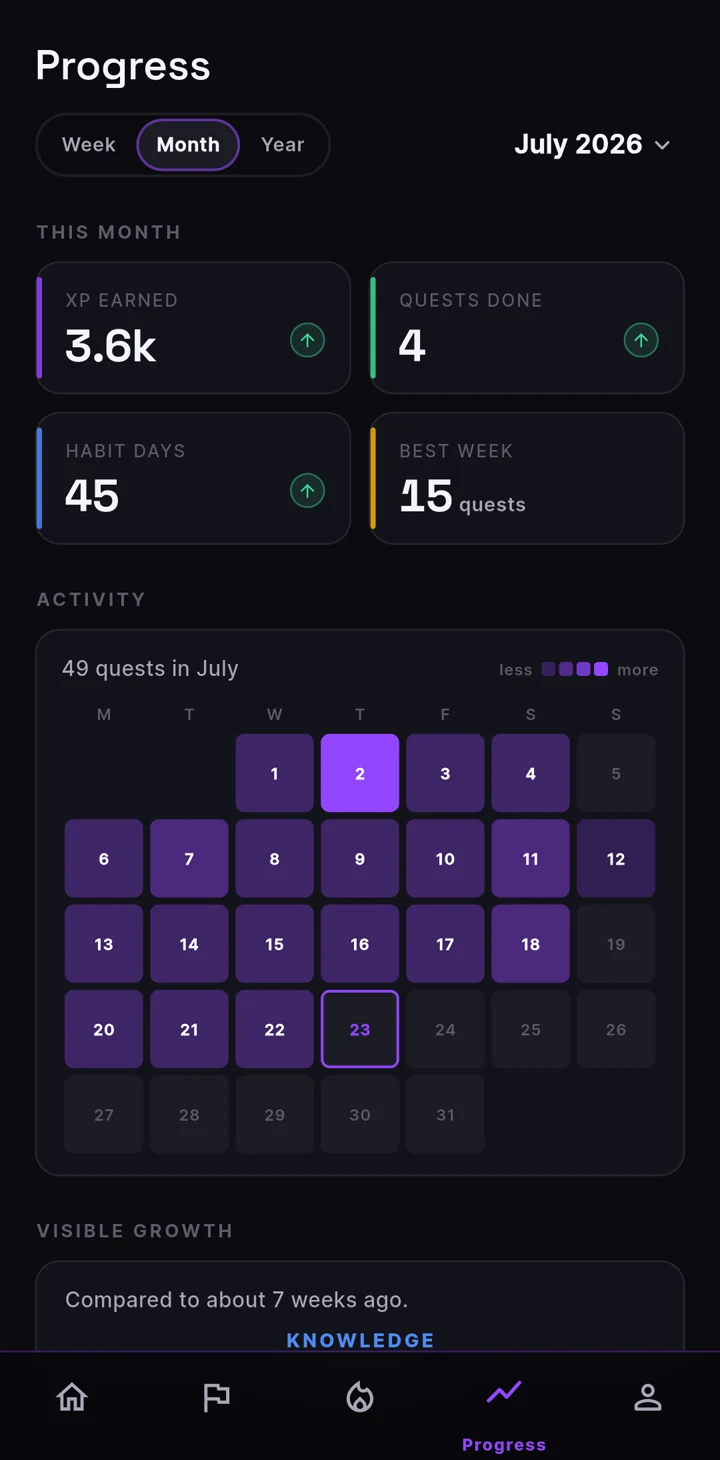
The Progress screen redraws your wheel over a week, a month or a year, and lays your earlier self underneath as a faded polygon. Growth you can’t feel day to day is obvious once this week sits on top of last month.
Nothing here is a leaderboard against anyone else. The only self you’re measured against is the one from before.
Make it yours
Just about everything is yours to shape.
You decide what finishing pays: XP, which stats it lands in, skills, a badge. The app never rates difficulty, because a 5K is nothing to one person and everything to another.
A quest can stay shut until conditions are met. Build them from any of seven things: another quest, a stat, a skill, your level, an achievement, a streak, a total.
Finishing one quest can lock its rivals out, which is how you commit. The app shows you both halves before you choose.
A counter quest has no checkbox. It keeps a tally and pays out every time you add one.
Give it conditions instead of a checkbox and it finishes on its own, on all of them or any of them.
System, light or dark, and any accent colour you want, picked from a full wheel and not a fixed palette. You can even reorder or hide the sections on your Home screen.
Team quests
Share one quest tree with up to five people. Every part is handed to someone, picked up by whoever’s free, or left open for anyone, and the board updates live for the whole team as it moves.
Rewards land on the whole team, or only on whoever closed the node. You decide that when you build it. Invites go out by link.
Global Quests
Every so often we run a community event: one quest, or a tree of steps, live for everyone at once on a shared deadline. We organise it across the app and our socials so the whole thing lands together.
Finish before the clock runs out and you can put your name on the Hall of Fame. It’s opt-in, and it’s a roll call, not a leaderboard: no ranking and no score. A live count shows how many people have finished the same thing, so you’re not doing it alone.
It all runs on the honour system. Nobody checks your work, and there’s no verification of your steps on our end, which is true of everything else in the app too.
Miss the window and you can still finish it for the XP and the achievement. It just won’t carry the “in time” mark. Global Quests sync, so they’re an online layer too.
Also in the app
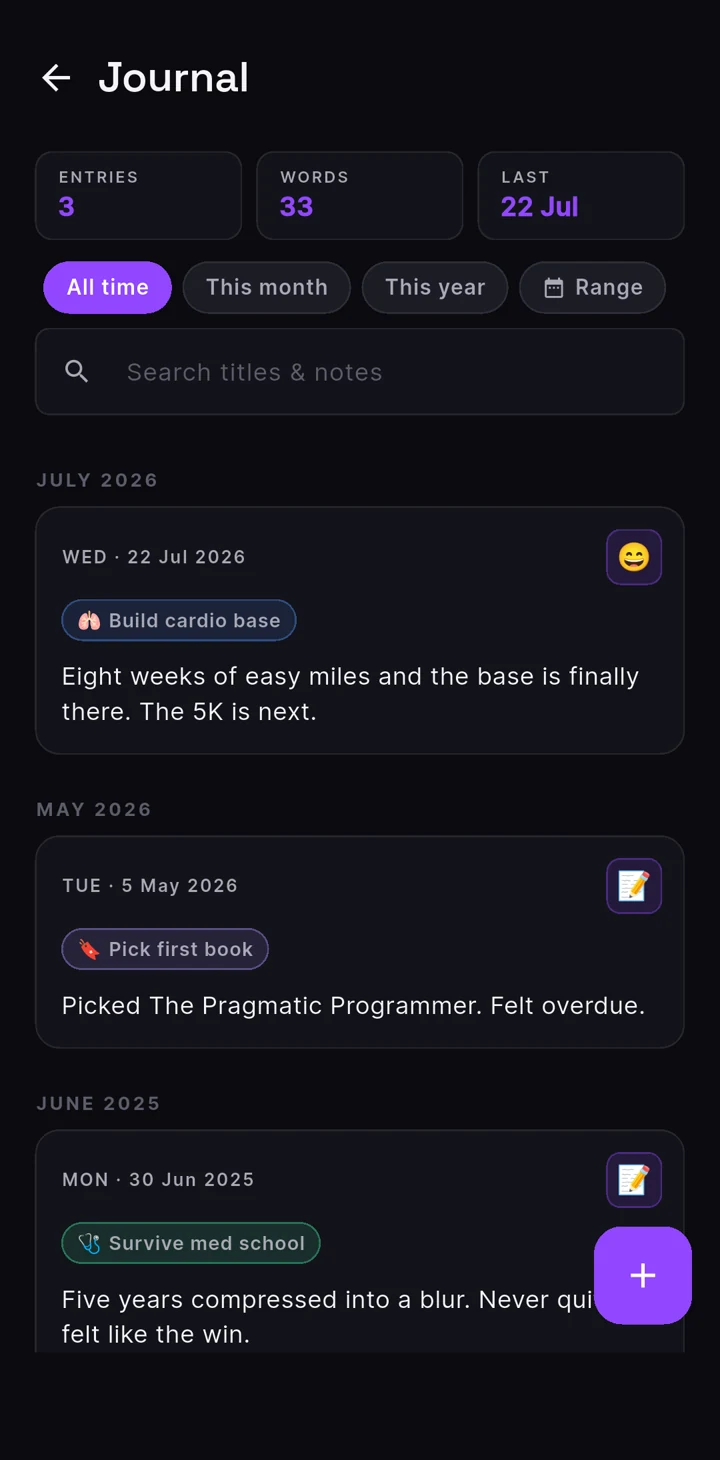
Somewhere to write down how things are actually going, not just what you ticked off. Each entry takes a mood and a date you can set back to yesterday, and you can pin it to a quest, habit or skill so the note turns up on that thing later. Finish a quest and it can leave one for you too.
The AI Quest Builder
The hard part is rarely the effort. It’s that “I want my life to be different” won’t fit on a to-do list. Say it badly and the AI Builder asks its way towards what you meant, until there’s a main quest on the board with sub-quests under it you could start tonight.
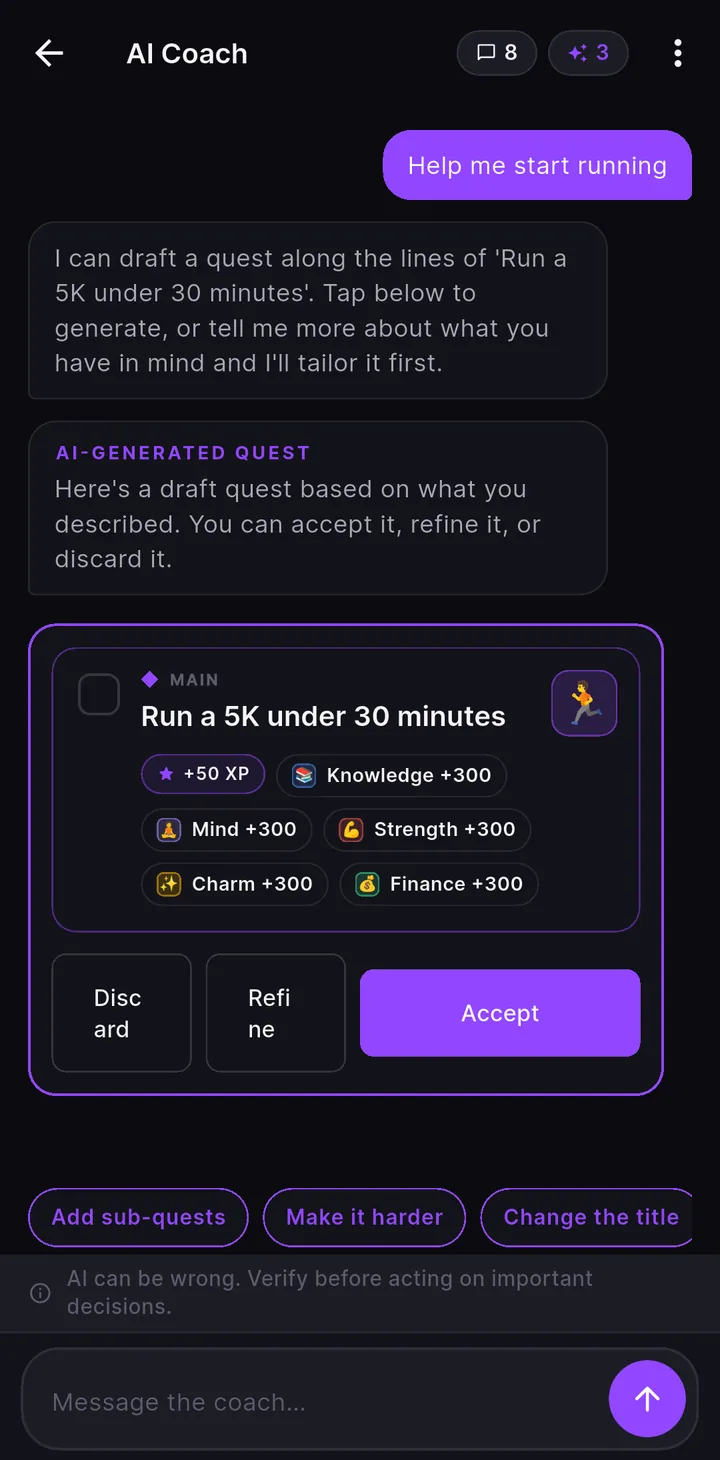
“I want to be less of a mess about money” isn’t a plan. It’ll dig until it is one, then draft the tree, which you’re free to tear up.
Not just a title. It proposes the tree, the XP each node pays, the stats that XP goes into, and skills to go with them, some of which it invents and leaves locked until you finish the quest that unlocks them.
Can’t name what you want, or stalled halfway through? Describe the mess in your own words and it turns it into a concrete next step you can take now.
Challenges
A push to stretch yourself, or to do the thing you’d never have picked on your own. Switch them on and the AI hands you a goal with a real deadline every so often, sized to the task and gone if you let it slide.
Pick how often you want one and the longest deadline you’ll accept. The AI sets the real one by how hard the task is, a day or two for something small and longer for a real commitment.
At your profile, at a single stat, at a topic you type in, or deliberately outside your comfort zone if you’d rather be handed something you wouldn’t have picked.
Past the deadline the challenge archives itself and marks itself missed. Nothing else happens, and the next one comes around.
What it costs
Every feature is free.
Quests, stats, skills, habits, achievements, the journal, both themes, all of it free and staying free. No feature sits behind a tier, and nothing here stops to show you an advert.
The only thing money buys is AI credits, sold in packs or monthly if that works out cheaper for you. They unlock nothing. Everything the builder makes you can make by hand: name the stats, write the quests, lay the whole tree out, for free. What the credits buy is the work of turning a vague want into a board you can start on.
Honestly
No guilt screen, no progress lost, no character quietly decaying while you were busy living. Your stats are exactly where you left them. Pick it up again whenever you do.
Every number is yours to edit, and there’s a screen in Settings specifically for adjusting XP by hand. Nothing checks anything. Tick a quest you didn’t do and you’ve fooled precisely one person.
No number in your character moves because you opened the app. They move when you do the thing.
Yours, locally
Quests, stats, skills, habits, achievements and the journal are written to your device and stay there. You sign in with Google or Apple so your account and AI credits survive a reinstall, and if you want your data to survive one too, you can switch on a backup to your own Google Drive, whether you signed in with Google or Apple. Team quests, Global Quests and the AI builder are the parts that have to be online, by nature.
Switch it on and your encrypted bundle goes to your own Google Drive. We don’t hold a copy, because we’d rather not be responsible for one.
The home-screen widgets have a lock-screen setting with three levels: show everything, show a stripped-back version, or show nothing at all until the phone is unlocked.
Sharing stays just as local. Any quest tree, skill, habit or achievement turns into a short code on your clipboard, and whoever pastes it back in gets a clean copy with your progress, streaks and dates stripped out. No account, no link, nothing routed through a server: the whole thing rides inside the code.
Early access
LifeQuest is in development and not on the stores yet. Leave an address and we'll write once, when there's a build worth your time.
One email, when it opens. Nothing else. See our privacy policy.